Rewards Earning / Redemption
Last updated: August 11, 2025
Overview
The cart-based loyalty earnings and redemption system enables brands using Appbrew to provide a seamless loyalty program experience directly within the mobile app's cart screen. It empowers customers to redeem accumulated coins or cashback, or earn rewards based on order value thresholds.
This feature enhances customer engagement and encourages repeat purchases by surfacing loyalty value at the most critical stage: right before checkout.
🎯 Primary Objectives
Drive conversions by surfacing reward benefits.
Increase cart value by encouraging customers to unlock reward thresholds.
Support retention through coin-based or point-based loyalty mechanisms.
Improve transparency around loyalty usage and eligibility.
Customer Guide
Getting Started
Pre-requisites:
Loyalty program set up with a supported provider (e.g., Nector, Yotpo, Flits, Popcoins).
Appbrew mobile app integration.
Shopify native checkout enabled (or) 3rd-party checkout system compatible with Appbrew.
If using Shopify native checkout:
Coin earnings, and redemptions will be surfaced on the cart page using the Appbrew cart block.
Appbrew cart redemption section triggers API calls to validate/redeem through the loyalty provider.
If using a 3rd-party checkout:
Coin logic is controlled externally.
The redemption is handled via third party checkout directly. Please check with them.
FAQ & Troubleshooting
🧩 Troubleshooting
Issue | Possible Cause | Solution |
Loyalty redemption not showing | Loyalty provider API not connected or user not logged in | Ensure login status and valid token call to provider |
Redeem checkbox not clickable | No coins available OR incompatible checkout | Check minimum balance, confirm Shopify native checkout |
Coins apply but disappear at checkout | Checkout integration missing loyalty data | Ensure redemption tokens are passed through checkout URL/API |
Message says coins worth ₹0 | Loyalty API returned zero value | Cross-check with loyalty provider dashboard for user balance |
No earning prompt showing | Threshold logic misconfigured | Verify conditions in the Cart Footer Block setup |
Customer-Centric FAQs
Q1. How do I redeem my loyalty coins in the app?
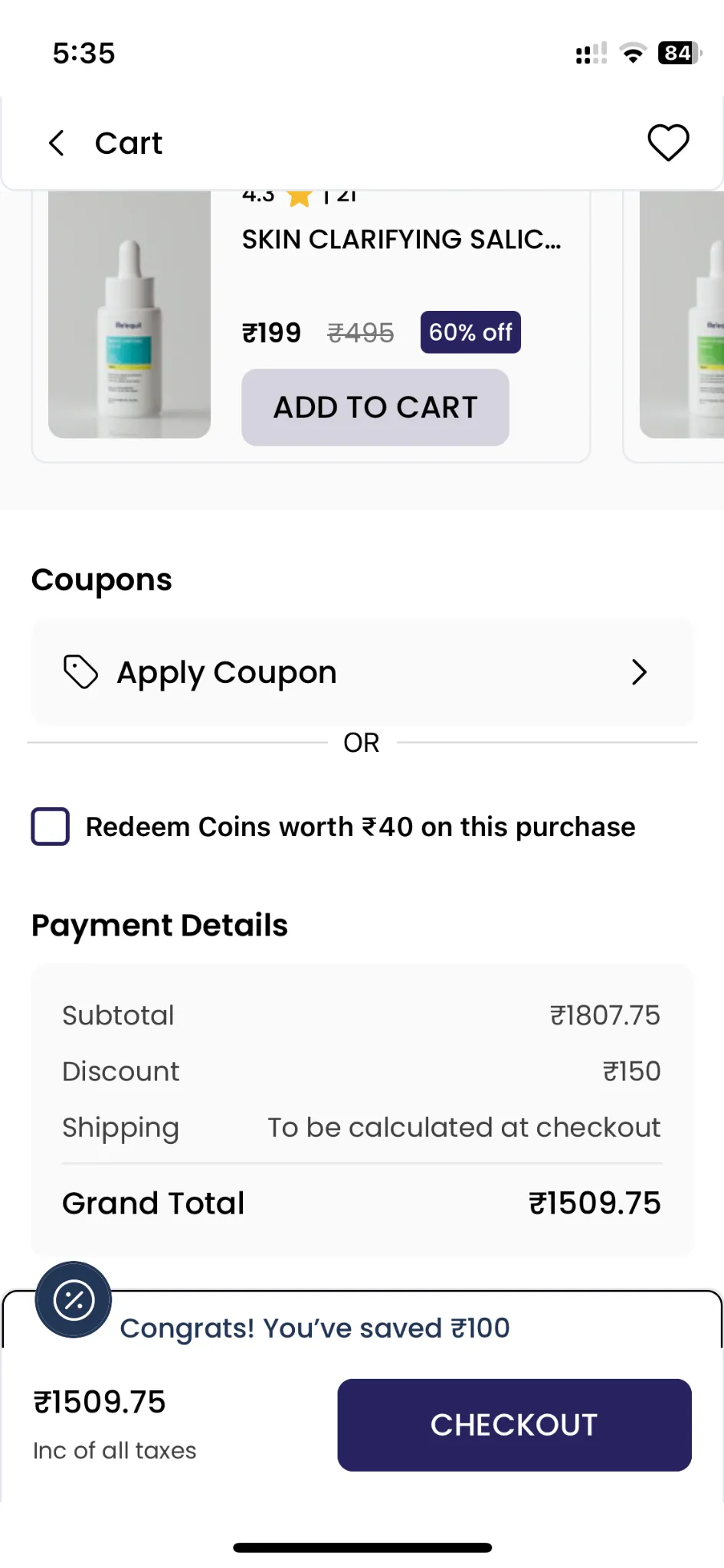
A: On the cart screen, look for the checkbox that says “Redeem coins worth ₹XX on this purchase.” Tap the box to apply your coins before checking out.
Q2. Why can’t I see the option to redeem my coins?
A: You may not be logged in or don’t have enough coins to redeem. Make sure you're signed in and have at least the minimum redeemable amount.
Q3. Can I apply a discount code and redeem coins together?
A: Some brands allow this combination while others don’t. If you try to do both and one disappears, it means stacking is disabled. Look for a note in the cart.
Q4. What does "Shop ₹XXX more to unlock a freebie/reward" mean?
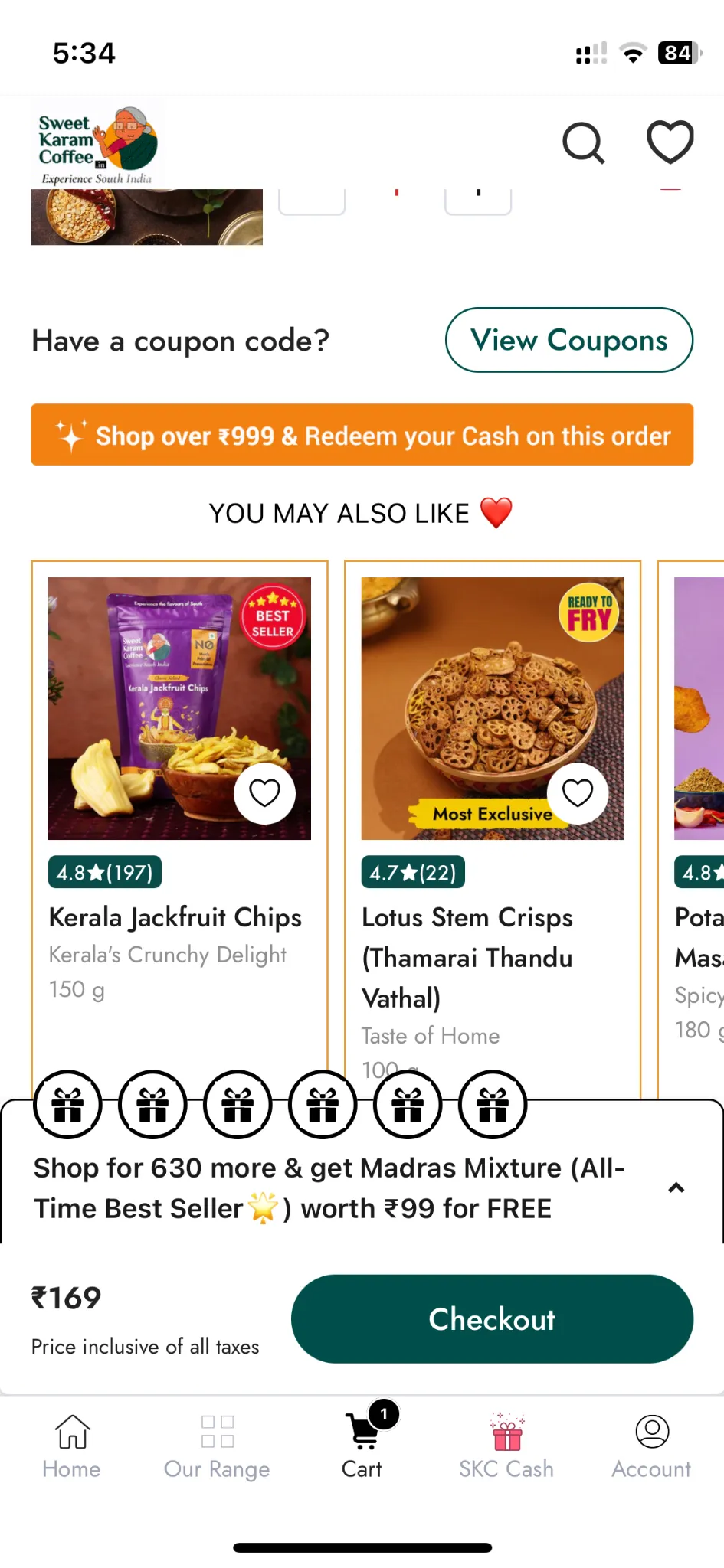
A: That’s a cart-based earning prompt. It tells you how much more to spend to unlock a special offer or free product. Add more items to qualify!
Q5. Will I earn coins on this order if I redeem some?
A: Typically, yes—but you might earn coins only on the non-redeemed portion. Check the brand’s loyalty policy or the reward program terms.
Q6. I checked the redeem box but don’t see a discount. What happened?
A: You may be using a 3rd-party checkout or facing a session timeout. Try logging in again or contact support.
Q7. Where can I see how many coins I have?
A: You can usually find your coin balance in your account section of your app.
Q8. What happens if I remove an item from the cart after applying coins?
A: If your cart total falls below the redemption threshold, the coins may automatically get removed. You’ll be able to reapply them if the threshold is met again.
Q9. Are loyalty coins refundable if I cancel my order?
A: Most brands restore unused coins back to your account on cancellation. Coins used on fulfilled orders may not be refundable. Refer to your brand’s coin refund policy.
Q10. Can I partially redeem coins and save the rest?
A: It depends on how the brand has configured redemption rules. Some brands allow custom inputs, while others auto-apply the maximum eligible amount.
Q11. Can I earn and redeem coins in the same transaction?
A: In most cases, yes. You'll earn coins based on the final payable amount after all discounts and redemptions.