Rewards Program Powered by Flits
Last updated: March 31, 2026
Overview
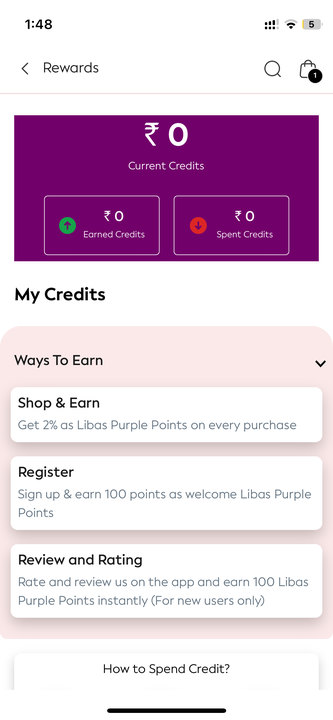
Appbrew supports native integration with Flits Rewards, enabling brands to offer loyalty points through a standard in-app rewards section. Customers can view points, earn rewards based on activity, and redeem them during checkout (based on checkout setup).
Please note: This implementation is standardized, and customizations to features or UI are not supported.
How It Works
Flits Rewards are accessible in the Account → Rewards section of the app. The following reward types are supported:
Reward Type | Description |
🛍 Shop & Earn | Points awarded for purchases |
🎂 Birthday Bonus | Bonus points on user’s birthday |
🆕 Sign-Up Bonus | Points awarded on successful new user registration |
⭐ Review & Rating | Points awarded for submitting product reviews |
⚠ Rules and earning conditions (e.g., “100 points on signup”) are configured in the Flits dashboard and reflected in the app UI accordingly.
Redemption Flow
Checkout Type | Redemption Display Location |
Shopify Native Checkout | Cart Page and Checkout Page |
GoKwik Checkout | Checkout Page only (Cart excluded) |
🔒 We follow checkout platform limitations. Redemption UI on the cart page is not shown when GoKwik is used.
Setup Instructions
Step 1: Finalize Rewards Rules
Please provide:
Rules for each reward type (e.g., how many points per purchase, signup bonus, etc.)
Step 2: Configure in Flits Dashboard
Add/update all reward rules via your Flits merchant dashboard.
Ensure earning and redemption conditions are consistent with what should be shown in the app.
Step 3: Appbrew Enables Integration
Once rules are finalized, Appbrew will integrate the Rewards section as per standard design.
Implementation turnaround: 5–7 working days after receiving all inputs.
Please setup the rules prior so that Appbrew team can test it out while working on the intergration.
📚 Live Design Reference
You can refer to the Libas mobile app to see the Flits Rewards integration in production and understand user flow and UI design.
Brand shares credentials/code
Flits User ID (for brand identification)
Authentication Token (for API access)
Rewards on sign-in Action Configuration:
Sign-in Action URL
Sign-in Action Key
Best Practices
Keep reward descriptions short and action-driven (e.g., “Earn 50 points by leaving a review”).
Promote reward milestones or signup bonuses on banners using Appbrew’s personalization tools.
Periodically review redemption behavior to optimize point value and engagement.
FAQs
Can I customize the rewards UI or add new features?
→ No. This is a standard implementation, and customization is not supported.
Where can I manage how points are awarded?
→ All configurations (rules, point values) are managed via the Flits dashboard.
Can users see their reward history?
→ The standard Rewards section includes balance and earning types, but not full transaction logs.
Can I configure Cash rewards for app downloads?
-> Unfortunately, Cash rewards cannot be configured for app downloads. This limitation exists because when a user downloads the app, their customer details are not available at that stage.
User information becomes accessible only after they complete the sign-up process within the app. Since Cash crediting requires customer data to identify and reward the correct user account, rewards cannot be processed at the time of download.
As an alternative, you can configure Cash rewards for other customer actions that occur after sign-up, such as account registration completion.
This technical limitation ensures that rewards are properly attributed to the correct customer accounts once their information is available in the system.