Free Gift with Purchase
Last updated: April 2, 2026
Free Gift with Purchase (GWP) is a promotional strategy where customers receive a free product when they meet specific criteria—such as spending a minimum amount, purchasing specific items, or adding eligible products to their cart.
The platform provides powerful customization options, including automatic gift addition, product-specific triggers, and customer-based targeting.
Getting Started
Free Gift with Purchase (GWP) offers let you automatically reward customers with one or more free products when they meet specific cart-based conditions. Appbrew provides full flexibility to run these offers within the app, alongside the website, or as app-only promotions.
This guide walks you through setting up a GWP offer using the Appbrew Dashboard.
Some example offers -
Offer Type | Example | Description |
Spend-Based GWP | Get a free lip balm on orders above $99 | Gift triggers when cart value reaches a threshold |
Product-Based GWP | Get a free brush when you buy a foundation | Requires the presence of specific products in the cart |
Quantity-Based GWP | Get 1 free tote bag when you add 3 or more products | Based on the number of items in the cart |
Buy X from Collection A, Get Y from B Free | Buy 2 skincare items, get 1 sample free | Gifts linked to purchases from specific product groups |
The following are the available configurations -
Condition | Description | Applies To | Use Case Example |
Minimum Cart Value | Gift is added only if the total cart value exceeds a set threshold | Entire Cart | Get a free pouch on orders above $999 |
Minimum Quantity of Items | Requires a minimum number of cart items to trigger the gift | Entire Cart | Add 3 or more items to get 1 free sample |
Required Product(s) in Cart | Gift is added only if specific product(s) are in the cart | Product Level | Get a brush free with a foundation |
Required Collection(s) in Cart | Gift applies only when items from selected collections are present | Collection Level | Buy from “Skincare” collection to unlock a free item |
Limit to 1 Use per Customer (Not available for Automatic offer) | Prevents multiple GWP redemptions by the same customer | Customer Level | One-time gift for first-time app users only |
Limit to 1 Gift per Order | Allows only one gift product per eligible cart | Order Level | Receive only 1 gift even if multiple conditions are met |
Eligible Customer Segments (Not available for Automatic offer) | Offer only applies to customers with specific tags or segments | Segmented Users | Free gift only for customers tagged "VIP" |
Allow Combination with Other Discounts | Gift can be combined with product/order/shipping discounts | Discount Stackability | Free gift + 10% off product |
Automatic or Code-Based | Choose whether the gift is added automatically or via a promo code | Application Type | Auto-add gift above $100 OR apply “FREEGIFT” code |
Setup Instructions
Please follow this guide to setup the offer : https://help.appbrew.com/articles/4406584920-how-to-configure-a-free-gift-with-purchase-offer-for-the-app
FAQ
Q: Why is the free gift not being added to the cart automatically?
A: This can happen due to a few common reasons:
Conditions not met: The required cart value, quantity, or product criteria must be fulfilled for the gift to apply.
Cart value after discounts: If a coupon reduces the cart total below the threshold, the gift won’t be added.
Freebie product not published to the Appbrew sales channel.
Gift out of stock: If the gift item is out of inventory, it cannot be added.
Conflicting discounts: Other discounts may override the freebie if combination settings are not enabled.
Old cart session: If a user had items in their cart before the gift rule was updated, it may not apply until the cart is refreshed.
Q:The gift is added to the cart but still shows a price. Why isn’t it free?
A: Please ensure that the ‘Do not create a new discount for this offer in Shopify’ option is not enabled. Since this setting cannot be changed in an existing discount, you’ll need to duplicate the current discount, uncheck this option in the new version, and then deactivate the original discount to avoid conflicts.
Q: A customer received the free gift without meeting the requirements. How did that happen?
A: This issue may be occurring because you're using a zero-priced SKU as the gift, which is not recommended. However, if you still choose to proceed with this approach, please ensure the following::
Freebie product is visible: If the gift product is searchable in the app, customers may add it manually. Use the
hide-apptag to prevent this.Quantity not restricted: Without the
free_gifttag, customers may add more than 1 gift. This tag ensures only 1 gift is added per order.
Q: Can I automatically add multiple free gifts when customers add multiple units of a qualifying product?
- Context : You want to set up a promotion where when customers add multiple units of a qualifying product to their cart, the same number of free gifts are automatically added. For example, if a customer adds 3 units of Product A, you want 3 units of the corresponding free gift to be automatically added to the cart as well.
Answer : This functionality is not directly possible with a single discount configuration. However, you can achieve this by creating multiple free-gift discounts with different quantity thresholds.
Here's how to set this up:
Create separate free-gift discounts for each quantity level you want to support
Set up discounts like:
B1G1 (Buy 1, Get 1 free)
B2G1 (Buy 2, Get 1 free)
B3G1 (Buy 3, Get 1 free)
When customers add multiple qualifying products, each applicable discount will trigger and add one free product per discount
For example, when a customer adds 3 units of the qualifying product, all three discounts (B1G1, B2G1, and B3G1) will apply, resulting in 3 free gifts being added to the cart.
This workaround allows you to achieve the desired functionality of matching the number of free gifts to the quantity of qualifying products purchased.
Q: Can I create slab-based offers with free gifts at ₹1 pricing?
Context
You want to create a tiered promotion system where customers receive free gifts at ₹1 based on their order value. For example, you might want to offer different free gifts at minimum order values of ₹599, ₹899, and ₹1199, with the option for customers who reach the highest tier to receive all eligible gifts from lower tiers as well.
Answer
Yes, both standard slab-based offers and cumulative slab offers (where higher tiers include all lower tier benefits) are feasible and can be configured using the discount system.
To set up this type of promotion, you'll need to create a total of 6 discounts:
3 eligibility discounts - One for each slab to make the free gift eligible at the defined minimum purchase amounts
3 pricing discounts - One for each free gift to reduce the product price to ₹1
For each slab, configure the following:
Set the minimum purchase requirement for the respective tier
Map the discount to the specific free gift product
Create a separate discount to adjust the free gift price to ₹1
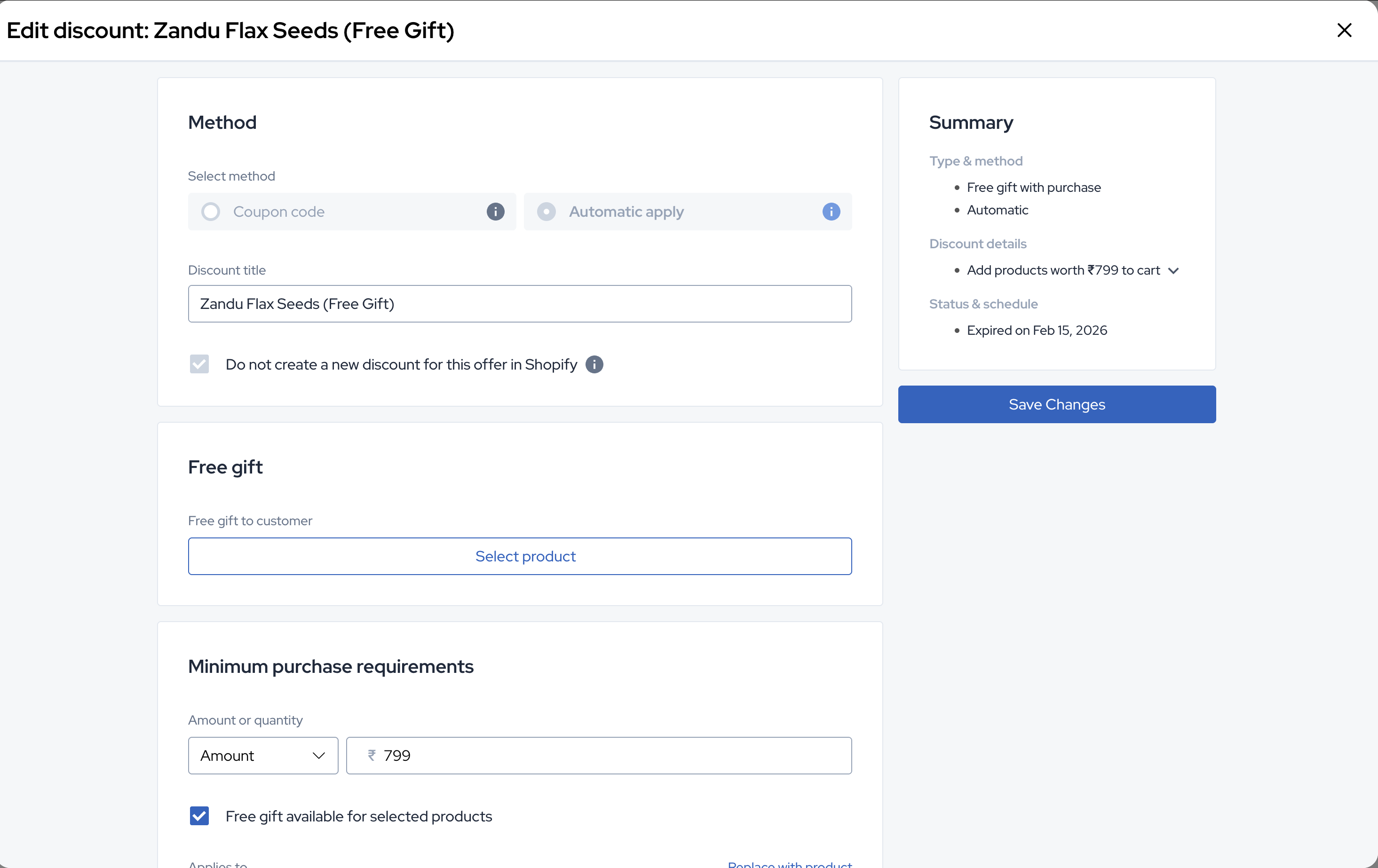
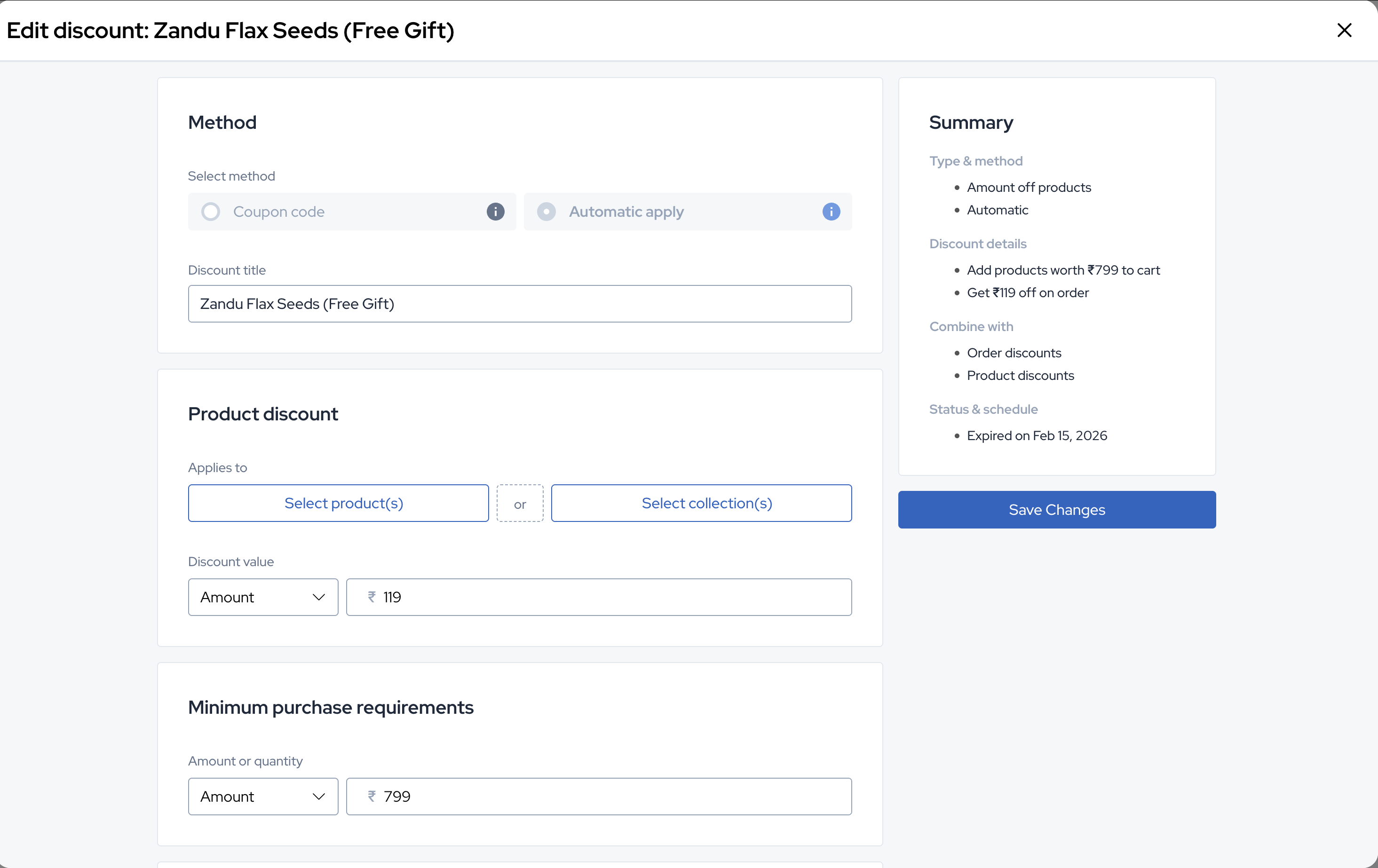
If you want customers who qualify for higher slabs to receive all eligible gifts from lower slabs as well, enable the "Allow combining with other discounts" option by checking the respective checkboxes.
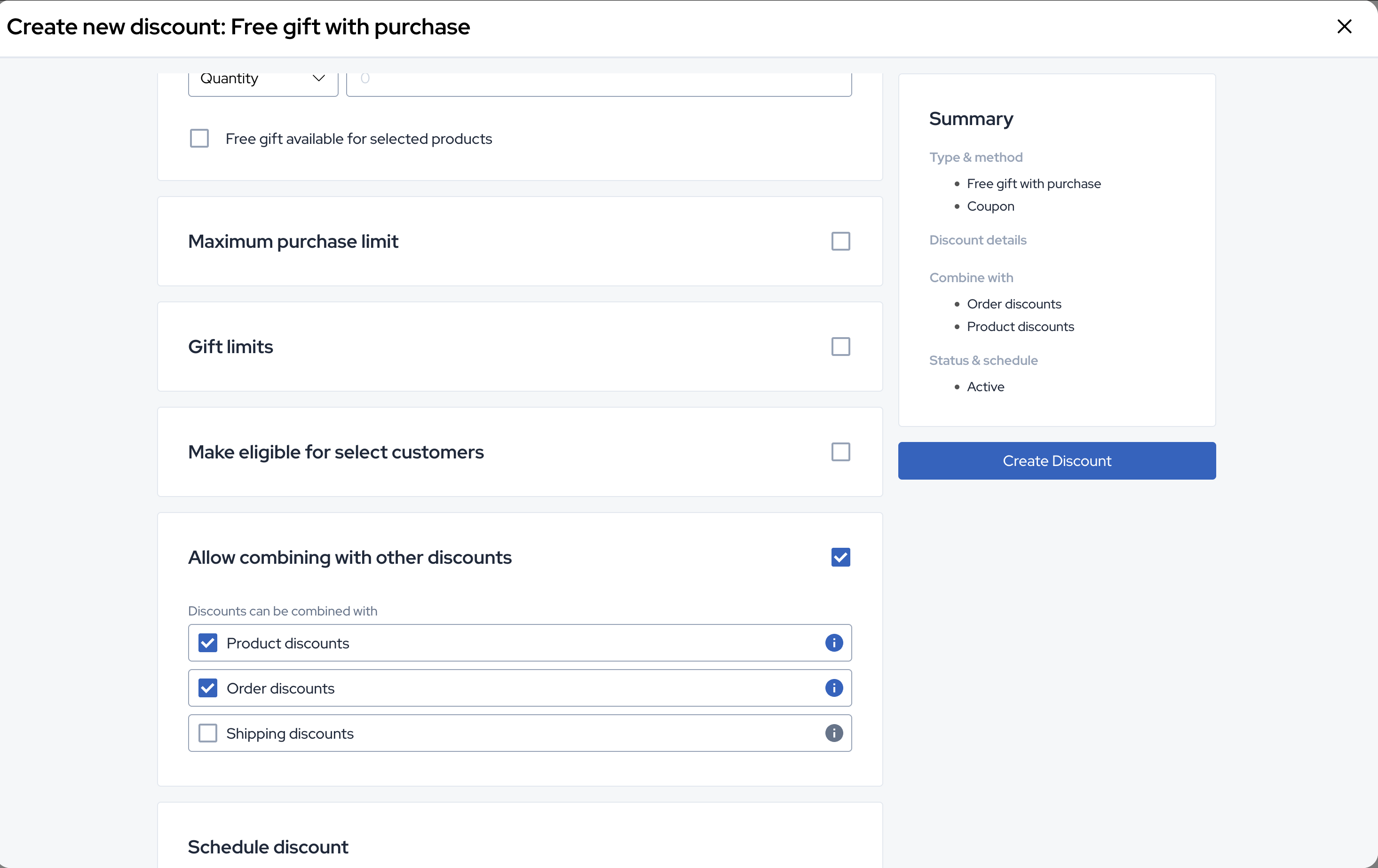
To speed up the setup process, you can duplicate existing similar discounts and adjust the eligibility and minimum purchase requirements rather than creating everything from scratch.