Google & Meta Ads Attribution for App
Last updated: March 3, 2026
1. Overview
When a customer clicks a Google or Meta ad and completes a purchase in your app, attribution is captured in two ways:
App Performance: In Shopify, these orders are tagged as "Appbrew" so you can see the total volume of sales driven by your mobile app.
Marketing Attribution: By using Google Web to App Connect and UTM parameters, you can identify exactly which campaign or creative drove that specific app sale.
2. Google Ads Specific: Web to App Connect (W2AC)
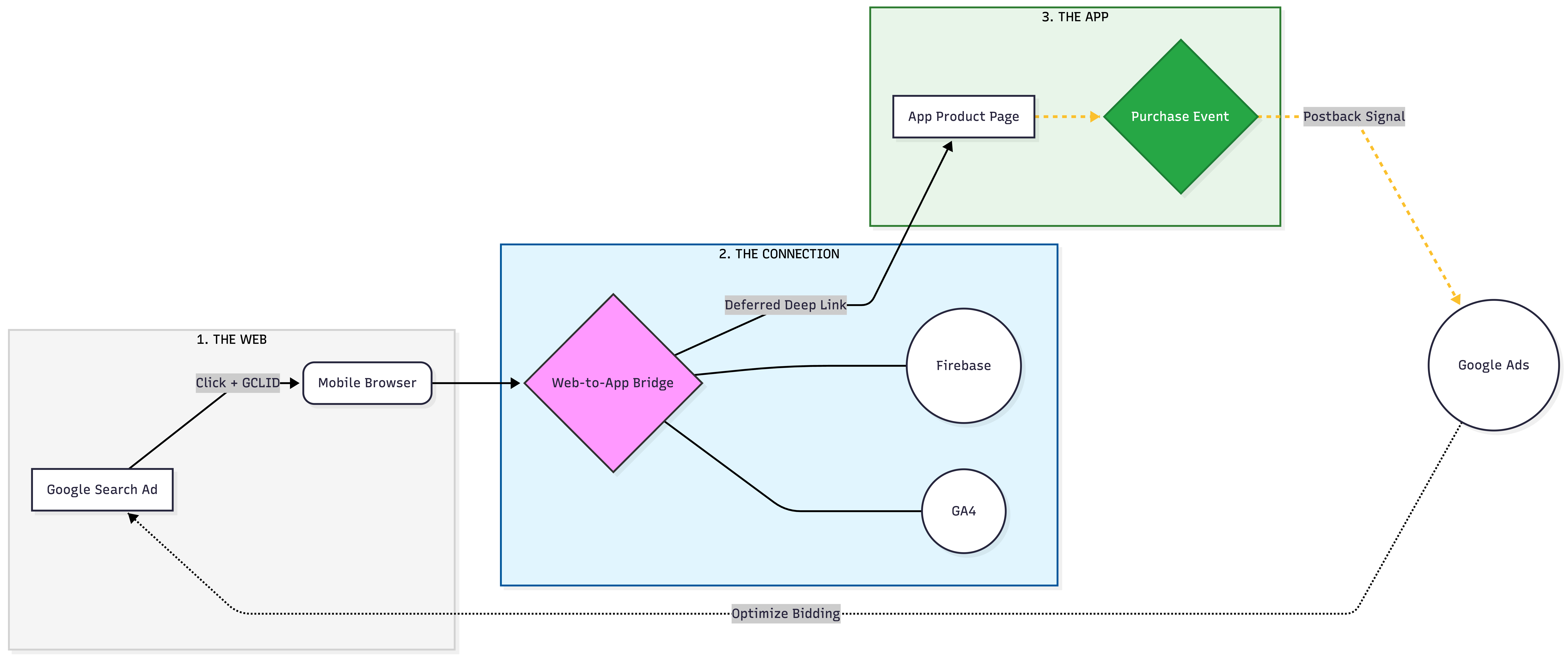
To ensure Google Ads receives full credit for app purchases that start from a web ad click, we implement Web to App Connect. This requires three technical pillars:
Pillar 1: GA4 & Firebase Integration
The app is integrated with Firebase (handled by Appbrew) and linked to your Google Analytics 4 (GA4) property.
Your GA4 property must be linked to your Google Ads account.
Pillar 2: Unified Conversion Tracking
You must track the purchase event on both your website and the app.
In Google Ads, these should both be set as Primary Conversion Events to allow Google’s AI to optimize for app sales.
Pillar 3: Deep Linking
We use deep links for both Android and iOS to ensure that when a user clicks an ad, they are taken directly into the app rather than a mobile browser.
3. Tracking the Customer Journey (Google & Meta)
The way attribution is captured depends on whether the customer already has your app installed.
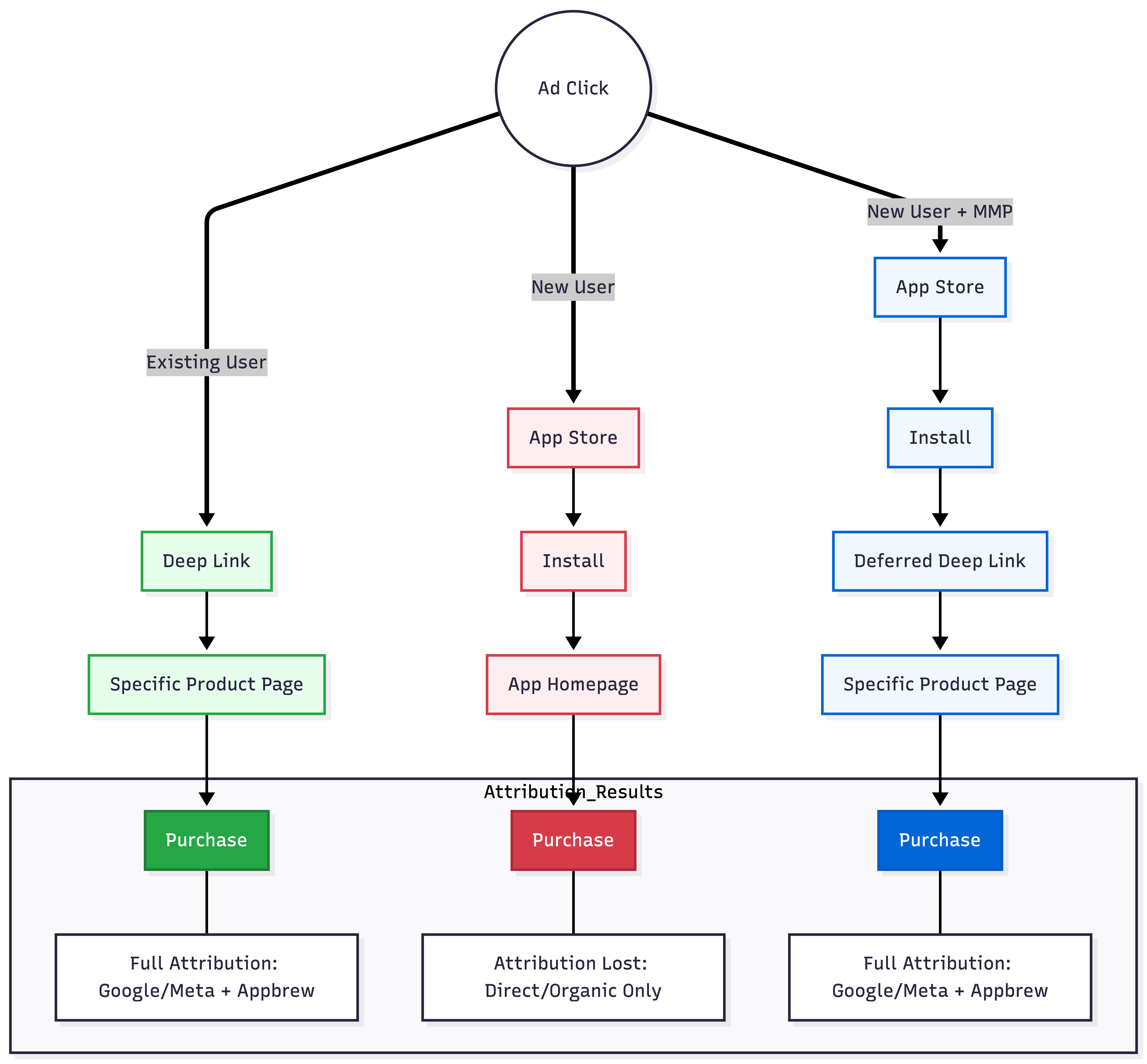
For Existing App Users
If a customer already has your app, clicking your ad will trigger a Deep Link.
The Experience: The user is taken directly to the specific product or collection page inside the app.
The Attribution: All UTM parameters (Source, Medium, Campaign) are preserved and passed through to Shopify, ensuring the ad platform attribution.
For New App Users
When a user clicks an ad but needs to download the app first, the journey involves the App Store or Play Store.
Standard Tracking: By default, once a user goes through the App Store to install, the original "click" data is refreshed. In your Shopify dashboard, these first-time purchases will appear as "Direct" traffic.
The Advanced Solution: To capture 100% of these new-user conversions and maintain the "Deep Link" (taking them to the product page after install), we recommend a Mobile Measurement Partner (MMP).
4. Use of Mobile Measurement Partners (MMPs)
For brands looking for "UTM-level" accuracy for both new installs and existing users, an MMP like Appsflyer or Adjust is the recommended solution.
Deferred Deep Linking: MMPs ensure that even after a user installs the app for the first time, they are still redirected to the exact product page they clicked on in the ad.
Full-Funnel Attribution: They "bridge" the gap between the ad click and the app store install, ensuring your Google and Meta dashboards reflect the true ROI of your campaigns.
Appbrew Integration: We offer native support for Appsflyer and Adjust to make this setup straightforward.
5. Frequently Asked Questions (FAQs)
1. Why do some of my app sales show as "Direct" in Shopify or GA4?
This typically happens with new users who do not have the app installed yet. When a user clicks an ad, goes to the App Store, and installs the app, the original "tracking context" (UTMs) can be lost during the installation process. To capture these users accurately instead of "Direct," we recommend using an MMP (Mobile Marketing Partner).
2. How to set up UTM tracking for the app?
For general app-promotion links, you can add UTMs directly in the Appbrew Dashboard. For specific product ads, you simply use the Google Campaign URL Builder with your Appbrew Deep Link.
3. What is the difference between a "Deep Link" and a "Deferred Deep Link"?
Deep Link: Works for users who already have the app. It takes them directly from an ad to a specific product page which is supported natively by Appbrew.
Deferred Deep Link: Works for users who do not have the app. It "remembers" the product they clicked on after they download and open the app for the first time. This setup requires an MMP (Mobile Marketing Partner) like Appsflyer or Adjust.
4. Why do I have to link Firebase to my Google Ads account?
Google Ads cannot "see" what happens inside a mobile app on its own. Firebase acts as the bridge. By linking them, you allow Google Ads to see when a purchase happens in the app, which allows Google to optimize your bidding for the highest possible ROAS.
5. Does this setup work for both iOS and Android?
Yes, the setup works for both iOS & Android. However, on iOS, attribution is subject to App Tracking Transparency (ATT). If a user opts out of tracking on their iPhone, the ability to link a specific click to a purchase is limited by Apple's privacy rules, regardless of the tools used.