App Transfer
Last updated: March 30, 2026
App Store -
Ensure you have created a new Apple developer account - https://app.usepylon.com/docs/2bbe3425-9503-4358-980e-3c698a0e61b9/articles/3348218d-ba6d-451f-a836-39a1942b4984
Accept Apple Developer License Agreement
Ensure the account holder has accepted the latest Apple Developer License Agreement.
This is typically done by logging into https://developer.apple.com/account.
Share access of new store with Appbrew by following this document - https://app.usepylon.com/docs/2bbe3425-9503-4358-980e-3c698a0e61b9/articles/e4b381a1-6061-4f79-911b-4e30524b9a19
Once access is received, Appbrew team shall confirm once. Post that - we will start with the app transfer.
Internal reference doc - https://developer.apple.com/help/app-store-connect/transfer-an-app/initiate-an-app-transfer
Once our team has initiated the transfer, you will get a request to accept the app transfer. Please follow this guide to do the next steps : https://developer.apple.com/help/app-store-connect/transfer-an-app/accept-an-app-transfer
Note : The account owner needs to accept this request to complete the app transfer process.
Play Store -
Can you please share the access to account at apps@appbrew.tech?
Also Please confirm the name of the developer account once.
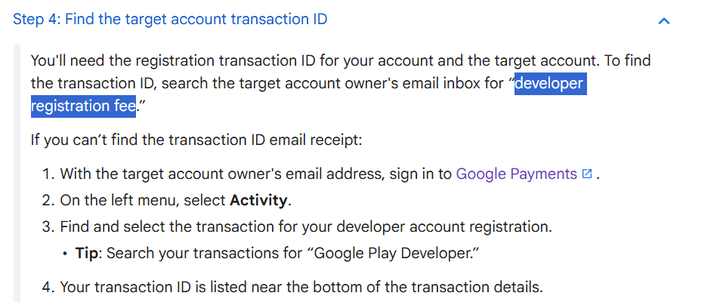
Please share the Play console transaction ID. Below screenshot outlines how you can find this.
Once access is received, Appbrew team shall confirm once. Post that - we will start with the app transfer.
Once our team has initiated the transfer, you will get a request to accept the app transfer.
You might need to fill in the following details while accepting the app transfer -
Developer Name : Appbrew Tech &
Developer account ID : 7416257373712880810
FAQs -
Q1: How do I change the App Store Connect authenticator phone number and account owner?
Ans: Both of these changes need to be made directly through Apple's systems and documentation.
To change your App Store Connect authenticator phone number:
Follow Apple's official documentation for updating your phone number
Complete the steps outlined in Apple's guide to update your authenticator phone number
To change the account owner:
Visit: https://developer.apple.com/help/account/access/transfer-the-account-holder-role/
Follow the detailed instructions provided by Apple for transferring ownership
These changes must be completed through Apple's official channels as they involve account security and ownership verification processes that only Apple can manage.