Cart View Customization in Appbrew – Brand Guide
Last updated: January 12, 2026
To help you explore cart view customization options and understand what's possible within Appbrew, we've created this guide that clearly outlines:
What you can customize directly via the dashboard
What is currently limited or not supported
✅ What You Can Customize in the Cart View
Appbrew gives you flexibility to enhance your cart experience using various tools in the dashboard:
1. Static Elements & Communication
You can add banners, text blocks, or any static content to the cart page (e.g., delivery messages, offer highlights, customer service info).
2. Upsell Section
Add a curated product collection to the cart page to encourage additional purchases.
You can simply achieve this directly via the dashboard. You can go the cart page and then click on "+" icon to add new blocks on the cart page. To upsell products on cart page > just select the "product list" block from the list and map a collection to it which will work as an upsell.
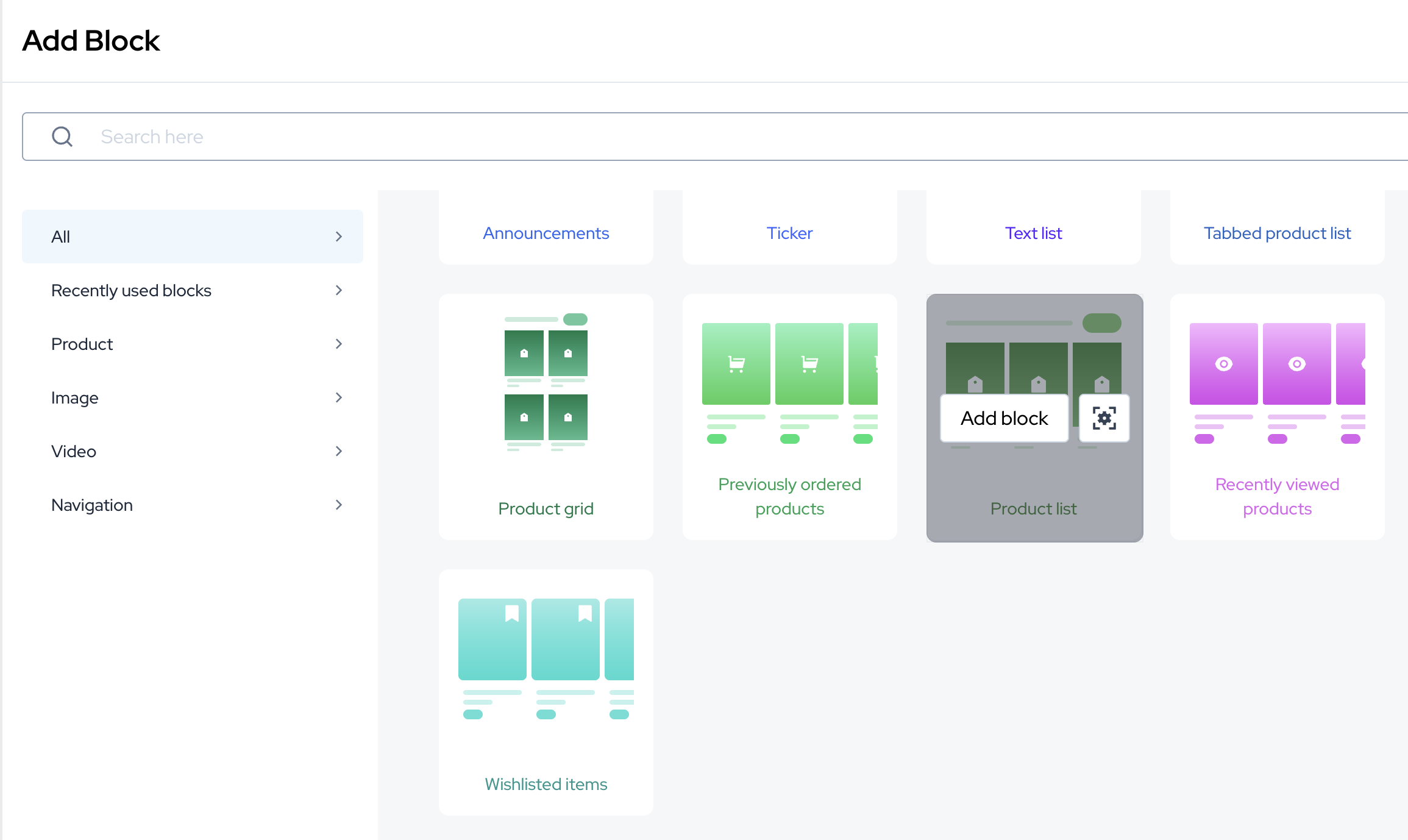
You can also use our cart upsell feature (available on only enterprise plan) which helps in providing more personalised experience.
3. Cart Goals (Spend-Based Rewards)
Set a spend target (e.g., “Spend ₹999 and get a free gift”) — when the customer hits it, the gift is automatically added at ₹0.
🎯 These can be set up directly through the dashboard.
Please refer this guide - https://appbrew.help.usepylon.com/articles/6669889662-cart-goals
4. Discounts & Coupons
Create app-only or bundle discounts.
Display available coupons to users via the Apply Coupon section.
Bundles apply automatically once conditions are met (e.g., “Buy 2 get 10% off”).
Please note - In case you are using third party checkout on app, then discounts need to be applied and managed at checkout directly. Due to this, we also don't show apply coupon block on cart page.
Also, it is not recommended to keep cart goals in such cases - as they are ideally setup and mapped with discounts. You can go through the guides to understand it better.
5. Visibility Controls
You can use our personalisation feature to show blocks based on certain criteria. You can learn more about personalisation here-
How to setup via dashboard - https://appbrew.help.usepylon.com/articles/7383052442-personalization-controls-in-appbrew
🚧 Features That Are Limited or Not Supported
Some customizations are limited due to Shopify’s structure or Appbrew’s platform-level design.
General Limitations
Core cart layout (e.g., structure, checkout button area) can’t be changed.
Checkout page content is mostly fixed (e.g., “Shipping calculated at checkout” text).
Not Supported Right Now
Adding wishlist icons in cart summary
Showing discount percentages or total savings
Full flexibility in coupon block design
Custom minimum cart values per brand/seller
Custom alignment (e.g., “Order Again” button placement)
Pulling product videos into cart page
Showing cart items after logout/login (Shopify limitation)
Coupon related error messages can't be customised.
FAQ's
Why isn’t my cart syncing between the website and the mobile app?
Currently, the website and the mobile app maintain separate cart sessions, even if a user logs in using the same mobile number or account on both platforms.
This means:
Items added to the cart on the website will not appear in the app cart
Items added in the app will not reflect on the website
Cart items cannot be merged or combined after login across platforms
This behavior is expected in the current setup, as both the website and app manage independent cart states at a session level.